Business Card – Modern Vertical: A Practical Guide to Professional Identity
In the evolving landscape of professional networking, the business card remains a tangible anchor for personal branding. While digital connections are ubiquitous, the physical exchange of contact information often carries more weight in establishing immediate credibility. Among the various design formats available, the Business Card – Modern Vertical has emerged as a preferred choice for individuals and agencies seeking a sleek, contemporary aesthetic that stands out in a stack of traditional horizontal cards.
This guide explores the utility, features, and practical applications of this specific template style. Whether you are a freelancer looking to establish your brand identity or a corporate entity refreshing its image, understanding the nuances of a vertical layout can significantly impact how your message is received.
The Shift from Horizontal to Vertical Design
For decades, the standard business card format was strictly horizontal, mimicking the orientation of a desktop screen or a landscape document. However, the rise of mobile technology and the changing habits of consumers have influenced design trends. The Business Card – Modern Vertical aligns with the way people naturally hold their smartphones—vertically. This ergonomic alignment creates a subconscious connection between the card and the device users rely on daily.
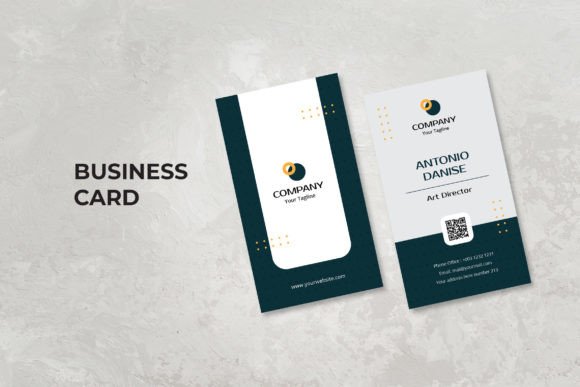
Beyond mere trendiness, the vertical orientation offers unique advantages for information hierarchy. By utilizing the extra height, designers can arrange content in a top-to-bottom flow that guides the reader's eye naturally. This structure allows for larger typography for names and titles without sacrificing essential contact details. It transforms the card from a simple data sheet into a mini-poster of professional identity.
Core Features of the Template
When evaluating the Business Card – Modern Vertical, it is important to look beyond the visual preview and understand the technical specifications that ensure a high-quality final product. The template is designed with precision to meet industry standards for print production.
- Standard Dimensions: The template adheres to the universal size of 90 x 51 mm (or 2 x 3.5 inches). This ensures compatibility with standard wallet slots, cardholders, and presentation folders.
- Precision Bleed: A crucial element for professional printing is the inclusion of a 0.25-inch bleed. This extra margin ensures that when the card is trimmed, there are no unsightly white edges, and the background color or image extends perfectly to the border.
- Print-Ready Quality: Set at 300 DPI in CMYK color mode, the document is optimized for commercial offset printing. This guarantees that colors appear vibrant and text remains sharp, avoiding the pixelation common in low-resolution web graphics.
- Software Compatibility: The file is provided in both AI (Adobe Illustrator) and PSD (Adobe Photoshop) formats. This dual-format approach caters to different workflows; vector-based editing in Illustrator allows for infinite scalability of logos and text, while raster editing in Photoshop offers flexibility for complex photo manipulations.
Customization and Ease of Use
One of the primary concerns for non-designers is the complexity of modifying a template. The Business Card – Modern Vertical addresses this through a well-organized layer structure. In both Adobe Photoshop and Illustrator, layers are grouped logically—for instance, separating background elements, typography, logo placement, and contact information. This organization makes the editing process intuitive, allowing users to locate specific elements quickly without cluttering the workspace.
The design philosophy behind this template is "clean, simple, and modern." It avoids excessive ornamentation, focusing instead on whitespace and typography to convey professionalism. Because the font usage is limited to free fonts, users do not need to worry about licensing issues or purchasing expensive typefaces to finalize their design. This accessibility lowers the barrier to entry for freelancers and small business owners who may be working with limited budgets.
Ideal Use Cases and Applications
The versatility of the Business Card – Modern Vertical makes it suitable for a wide array of scenarios. Its modern aesthetic resonates particularly well with industries that value innovation, creativity, and forward-thinking approaches.
Personal Branding and Freelancing
For freelancers, consultants, and independent creators, the card is often the first physical representation of their work. A vertical layout allows for a bold display of a name or monogram, reinforcing personal branding. The clean lines suggest efficiency and clarity, traits highly valued by clients seeking professional services.
Corporate and Agency Identity
While often associated with creative fields, the template is equally effective for corporate environments. Agencies, marketing firms, and tech startups can use the vertical format to differentiate themselves from competitors who still use generic horizontal cards. The structured layout supports the inclusion of multiple contact methods, such as QR codes linking to portfolios or social media profiles, which fits seamlessly into a vertical column.
Magazines and Publications
Editorial professionals and magazine staff often require cards that reflect the publication's design language. The modern, minimalist style of this template can easily be adapted to match the cover design of a magazine or the branding of a digital news outlet, ensuring consistency across all touchpoints.
Practical Considerations and Limitations
While the Business Card – Modern Vertical offers numerous benefits, it is essential to approach its adoption with realistic expectations. The primary consideration is the audience. In highly traditional sectors like law, finance, or government, a vertical card might be perceived as unconventional. In these contexts, sticking to the classic horizontal format may be safer to avoid any unintended distractions.
Another factor to consider is the content density. Because the width is narrower than a horizontal card, there is less room for side-by-side information. Users must prioritize their most critical contact details. Attempting to cram too much text onto a vertical card can result in a cramped appearance that undermines the "clean" design ethos. Success lies in strategic editing—removing unnecessary words and relying on clear icons or abbreviations where appropriate.
Additionally, users should be aware that the images used in the preview files are for demonstration purposes only. These stock photos are not included in the downloadable package. When customizing the template, users will need to source their own high-resolution imagery or replace the placeholders with their own branding assets to achieve the desired look.
Evaluating Suitability for Your Project
Before committing to the Business Card – Modern Vertical, ask yourself a few key questions regarding your specific needs:
- What is the goal of the card? If the aim is to spark conversation and showcase a creative portfolio, the vertical format is an excellent tool. If the goal is purely functional data transfer in a conservative setting, a simpler design might suffice.
- Do I have the necessary software? Since the files are layered for Adobe Photoshop and Illustrator, access to these programs (or compatible alternatives like Affinity Designer or GIMP) is required for full customization. Without them, the potential of the template cannot be realized.
- Is my content concise? Ensure you have distilled your contact information down to the essentials before beginning the design process. The vertical layout rewards brevity.
Conclusion
The Business Card – Modern Vertical represents more than just a change in orientation; it signifies a shift towards dynamic, mobile-friendly professional identity. With its robust technical specifications, including 300 DPI resolution, CMYK settings, and precise bleed margins, it provides a solid foundation for high-quality print production. Its fully editable nature in Adobe Photoshop and Illustrator empowers users to create a unique asset that reflects their personal or corporate values.
Whether you are launching a new agency, rebranding as a freelancer, or simply updating your professional toolkit, this template offers a blend of modern aesthetics and practical functionality. By understanding its strengths and limitations, you can leverage this design to make a lasting impression in an increasingly crowded marketplace. Remember, the best business card is one that not only looks good but also effectively communicates who you are and how others can connect with you.